Import manual
Introduction
FeneCAM provides powerful data import/export features. Data can be loaded into the application using
plain text CSV (.csv) files or from Microsoft Excel® sheet files (.xls,
.xlsx).
Usually, similar applications have to load stocks data and parts/panels from two different files which is
uncomfortable.
FeneCAM uses more sophisticated data import process and can load all data (not only stocks or parts)
from a single file.
Key column
One of the most important part of our CSV and Microsoft Excel? file format is the first column, called Key column. Value in this column identifies, what type of data are stored in corresponding row and its cells.
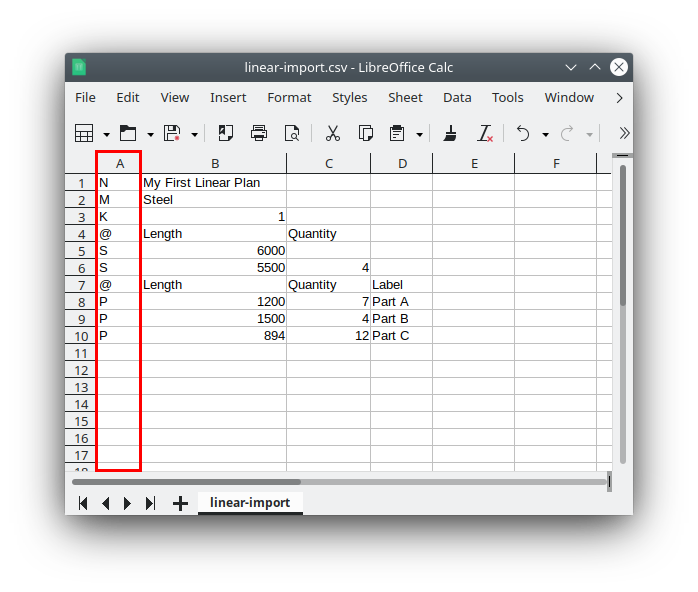
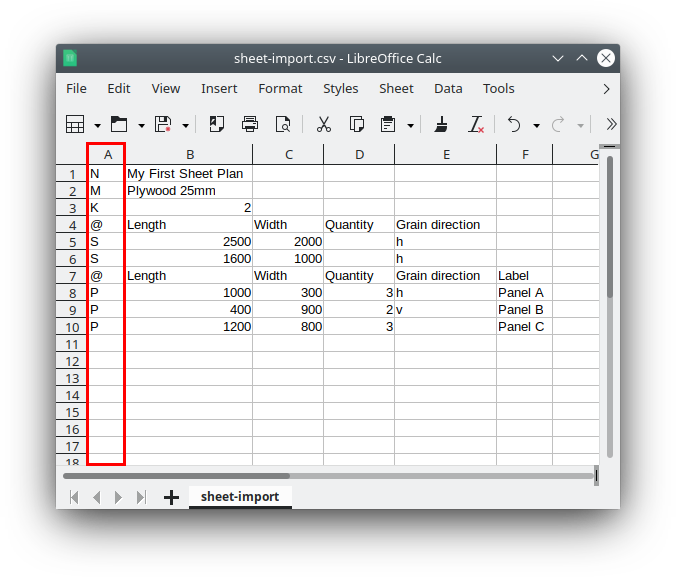
Key column is marked red in the following examples. As you can see, data file looks very similar as our input forms for linear cutting plans.
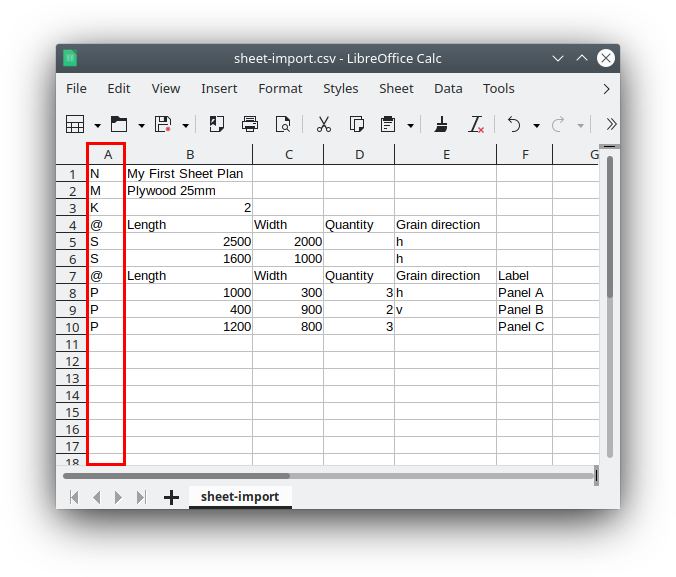
Data files description
Linear data file format
| Key | Description | Parameters (columns after key) |
|---|---|---|
N |
Cutting plan name | Name text |
M |
Material description | Material name/description |
K |
Kerf (blade thickness) | Width in mm |
LT |
Left trim cut | Length in mm |
RT |
Right trim cut | Length in mm |
O |
Optimization algorithm | c = cost minimization |
MR |
Minimal remnant length | Length in mm |
S |
Stock material definition | Length, Quantity, Group, Price, Priority, Width, Axial symmetry. Quantity, group, price, priority, width and axial symmetry may be empty. Priority: y or a number. Width and axial symmetry are used for angle cuts.
Axial values: xyz, x, y, z, n. |
P |
Part to cut | Length, Quantity, Label, Group, Left angle, Right angle. Label, group and angles may be empty. Empty angles mean 90°. |
@ |
Comment (row ignored) | Any text |
Example data format
N,My Cutting Plan
M,Aluminum Profile 6060
K,3
LT,5
RT,5
MR,100
S,6000,10,Main Stock,15.50,1
S,4000,5,Offcut,10.00,2
P,500,20,Part A,Group1
P,750,15,Part B,Group1
P,1200,8,Part C,Group2
@,This is a comment line
Sheet / Panel data file format
| Key | Description | Parameters (columns after key) |
|---|---|---|
N |
Cutting plan name | Name text |
M |
Material description | Material name/description |
K |
Kerf (blade thickness) | Width in mm |
LT |
Left trim cut | Length in mm |
RT |
Right trim cut | Length in mm |
TT |
Top trim cut | Length in mm |
BT |
Bottom trim cut | Length in mm |
O |
Optimization algorithm | c = cost minimization. Available only if prices are used on stocks. |
R |
Roll material | y = use roll-material optimization |
S |
Sheet stock definition | Length, Width, Quantity, Grain orientation, Group, Price, Priority. Quantity, grain, group, price and priority may be empty. Grain: h horizontal, v vertical.
Priority: y or a number. |
P |
Panel to cut | Length, Width, Quantity, Grain orientation, Label, Group. Grain, label and group may be empty. Grain: h horizontal, v vertical. |
@ |
Comment (row ignored) | Any text |
Example data format
N,My First Sheet Plan
M,Plywood 25mm
K,2
LT,2
RT,2
TT,3
BT,3
@,Length,Width,Quantity,Grain direction
S,2500,2000,,h
S,1600,1000,,h
@,Length,Width,Quantity,Grain direction,Label
P,1000,300,3,h,Panel A
P,400,900,2,v,Panel B
P,1200,800,3,,Panel C
@,This is a comment line
Useful tips
- None of mentioned keys/rows is mandatory. You can create your own CSV or Microsoft Excel? file which contains (for example) data for stocks and/or parts only.
- Import file may contain multiple rows for Stocks or Parts/Panels - similarly as in our cutting plan input forms.
- Same data structure is valid for CSV and Microsoft Excel? files. Cells in CSV file must be separated by comma.
- All numeric values should be plain numbers without units or formatting.
- Rows starting with
@are treated as comments and will be ignored during import. - The Group parameter allows you to organize stocks and parts into logical groups for easier management.
Last update: August 24, 2026